
Incorporating Java streams into your automation project is not overly challenging. In this article, we will demonstrate how straightforward it is to utilize streams for manipulating and extracting desired data,
thereby reducing the amount of code you need to write.
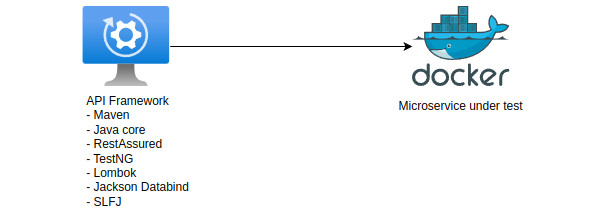
For this article we will build an automation framework and use maven for dependency management together with the following dependencies:
- RestAssured – This is the easies API client that you can integrate into your API framework and it’s also easy to use and understand
- TestNG – We will use it to define our test and before/after execution of the code (can be replace with JUnit also)
- Lombok – Dependecy used to remove a lot of boilerplate code like creation of getters/setters etc.
- Jackson Databind – We will use Jackson to map our rest response into a data model class created in the framework
- SLFJ – Added in order to enable @Slf4j annotation from lombok and print our data into the console
- Assertj-core – Used for asserting values in our tests and usage of SoftAssertions
Prerequisites:
- Maven
- Docker
- Java 8 or higher (project was made with Java 17)
/**
 * Microservice can be started by running the docker command :
 * docker run -it -p 8080:8080 razvan1987/microservice_bonus:v1
 * <p>
 * Swagger URL: http://localhost:8080/swagger-ui.html
 * <p>
 * Date format: YYYY-MM-DD
 */
If you already have some knowledge about automation and java streams you can also go directly to the project location : https://github.com/diaconur/core-java-automation
Short story and API’s covered
Java introduced the API abstraction called streams starting with version 8, aimed at offering a more efficient approach to processing data in a declarative manner. Additionally, it facilitates parallel execution on your data. Streams prove particularly useful when handling collections, offering a range of chaining methods for effortless data manipulation, culminating in various collection methods for retrieval.
When we create a stream, we can apply different type of operations to transform and get the data we need, the picture bellow show some of intermediate and terminal operations that we can use.

Some usefull operations that we can use in our automation framework when dealing with collections are : Stream.filter,Stream.map,Stream.forEach,Stream.collect
Usage of streams when dealing with API calls and RestAssured
- IntStream usage
One simple way to use IntStream is to replace the clasic for increment
IntStream.range(0, BonusValues.values().length).forEach(i -> {
            try {
                RestAssured.given(requestSpecification)
                        .body(buildBodyRequest(i))
                        .headers(Map.of("Content-type", "application/json"))
                        .post("/addBonus");
            } catch (JsonProcessingException e) {
                throw new RuntimeException(e);
            }
        });
In this case, a POST API call is done to the service started in docker where the BASE URI is :
http://localhost:8080/bonus
And the BonusValues is an enum that we use to populate specific bonuses that an employee took over the last years
@Getter
@RequiredArgsConstructor
public enum BonusValues {

    BONUS0("WELCOME", "JOIN_US","2020-03-01", "2020-03-01"),
    BONUS1("RAISE", "ANUAL_RAISE","2021-01-01", "2021-12-30"),
    BONUS2("RAISE", "ANUAL_RAISE","2022-01-01", "2022-12-30"),
    BONUS3("RAISE", "MID_RAISE","2022-01-01", "2022-06-30"),
    BONUS4("BIRTHDAY", "HOLIDAY","2023-06-06", "2023-06-06"),
    BONUS5("NAME_BIRTHDAY", "HOLIDAY","2023-10-06", "2023-10-06"),
    BONUS6("CHILD_BIRTH", "HOLIDAY","2023-10-06", "2023-10-06"),
    BONUS7("HARDWARE", "LAPTOP","2024-01-05", "2024-01-05"),
    BONUS8("HARDWARE", "HEADPHONES","2024-02-05", "2024-02-05");

    private final String bonusName;
    private final String bonusType;
    private final String startTime;
    private final String endTime;
}
2. IntStream with forEach
Our service can delete bonuses by receiving the bonus id automatically incremented for each POST or creation of a bonus.
We can use IntStream.range again to get first and last Id’s created by the previos post but before deletion we need to know the existing Id’s so we execute a GET statement
Get and store entries into a Response global variable, so we don’t have to execute the GET in every test, then with the jackson dependency we will map the response to a list of bonuses, further we will execute operation on that list.
getEntries = RestAssured.given(requestSpecification).get("/getAllBonuses");
        bonusList = getEntries.jsonPath().getList("$", BonusResponse.class);
        log.info("Available entries are: {}", bonusList);
and delete the entries with a forEach implementation
IntStream.range(bonusList.get(0).getId(),
                        bonusList.get(bonusList.size() - 1).getId() + 1)
                .forEach(nr -> {
                    try {
                        RestAssured.given(requestSpecification)
                                .pathParams(Map.of("id", nr))
                                .delete("/deleteBonus/{id}?id=" + nr);
                    } catch (RuntimeException exception) {
                        throw new RuntimeException("Could not delete entries!");
                    }

                });
With range we iterate through each bonus id created and then we pass that Integer to the forEach by using a lambda syntax, then for each id we delete the entry.
3. Using Stream.filter and Stream.collect
In an automation framework the creation and deletion of the data can be executed into a @Before and @After block from TestNG or JUnit.
The framework from this article does the same, creates fresh data with a @BeforeTest entry and then it deletes the data at the end by using a @AfterClass.
The test that you create can then execute different operations on our Response that we mapped into a list with jackson
For example we can get specific bonuses by using :
List<BonusResponse> welcomeEntries = bonusList.stream()
                .filter(bonus -> bonus.getBonusName().equals("WELCOME"))
                .collect(Collectors.toList());
Without a stream we could get the data by using a forEach bloc with a IF statement, further we need to add it to a list
BonusResponse welcomeEntry = null;
        for (BonusResponse bonusResponse : bonusList) {
            if (bonusResponse.getBonusName().equals("WELCOME")) {
                welcomeEntry = bonusResponse;
                break;
            }
        }
We can see that the code complexity is not that difficult and has a logical approach of FILTERING and then COLLECTING.
Create a map by bonusType and count the type of bonuses that the user received and then assert the number of entries for each type
Map bonusesMap = bonusList.stream()
                .collect(Collectors.groupingBy(BonusResponse::getBonusType, Collectors.counting()));

        log.info("Bonuses received are: {}" + bonusesMap);

        SoftAssertions softAssertions = new SoftAssertions();
        softAssertions.assertThat(bonusesMap.get("LAPTOP")).isEqualTo(1);
        softAssertions.assertThat(bonusesMap.get("JOIN_US")).isEqualTo(1);
        softAssertions.assertThat(bonusesMap.get("HEADPHONES")).isEqualTo(1);
        softAssertions.assertThat(bonusesMap.get("HOLIDAY")).isEqualTo(3);
        softAssertions.assertThat(bonusesMap.get("ANUAL_RAISE")).isEqualTo(2);
        softAssertions.assertThat(bonusesMap.get("MID_RAISE")).isEqualTo(1);
        softAssertions.assertAll();
With one line of code we created a Map and used the bonusType as a KEY and counted the number of each type as a VALUE.
Another way to create a map is to use the Collectors.toMap and then choose that we can use for a key and what for value.
In this case we need to be sure that that the data selected for key is uniques and if it’s not you will receive an exception while trying to create the map.
 // In case you have duplicate keys you will receive an exception
        // For example filtering by key ANUAL_RAISE :
        //  java.lang.IllegalStateException:
        //  Duplicate key ANUAL_RAISE (attempted merging values 2021-01-01 and 2022-01-01)

        Map bonusesMap = bonusList.stream()
                .filter(val -> val.getBonusName().equals("HARDWARE"))
                .collect(Collectors.toMap(val -> val.getBonusType(),
                        BonusResponse::getStartTime));
The code will first filter the entries for all bonuses that have bonusName=HARDWARE and then create a map by using the bonusType as a key and startTime as values.
There are numerous methods available in the streams package that can be employed in automation. However, in many instances, we primarily focus on filtering data and extracting specific fields for subsequent assertion and value checking.
Further resources about streams can be found below and can be seamlessly integrated into your framework, replacing multiple lines of code with just a few.
Resources and further reading:







 Development & Automation
Leave a reply to Andrei Rotariu Cancel reply