
The implementation involves using the EC2 and S3 clients to create, interrogate, and delete objects in the AWS infrastructure.
The specification file will create the resources, and at the end, it will delete them so we can have a clean environment for every test that we execute.
The project serves as a foundational starting point, establishing a framework for future integrations, whether within an automation framework or incorporated into a microservice or integration tests of a microservice. The implementation can be enhanced further by incorporating additional actions or integrating new AWS dependencies from the SDK to generate additional resources.

Set of Java SDK operation executed in AWS and resources created and deleted
Project requirements:
- Gauge installed on local machine -> check how to install
- AWS free tier account -> create account
- Create new IAM user with EC2 and S3 permissions
- Java and maven installed on local machine (Project used Java 11.0.12 and Maven 3.6.3)
Maven main AWS dependencies used and versions
Regarding AWS dependencies, the project will only import bom version 2.21.0 and S3,EC2 and apache client used by aws for the API calls
  <dependencyManagement>
        <dependencies>
            <dependency>
                <groupId>software.amazon.awssdk</groupId>
                <artifactId>bom</artifactId>
                <version>2.21.0</version>
                <type>pom</type>
                <scope>import</scope>
            </dependency>
        </dependencies>
  </dependencyManagement>
Creating a new IAM account with S3 and EC2 permissions
NOTE: Ensure that you choose the AWS region closest to your location to mitigate latency issues and make a note of it, as it will be utilized later in the project.
Once you have the AWS account, you can login and search for:
IAM (Identity And Access Management) > Users > Create user
Select “Attach policies directly” if you create a new user

Create the user

After creating the user, you should generate an access key. Along with the access key, you will also receive a secret key. Remember to save both keys as you will require them later in the project.
NOTE: For a new user you will have to create an access key if you don’t have one already.

And then choose “Application running outside AWS” > Create access key (Save both of the keys into a file)
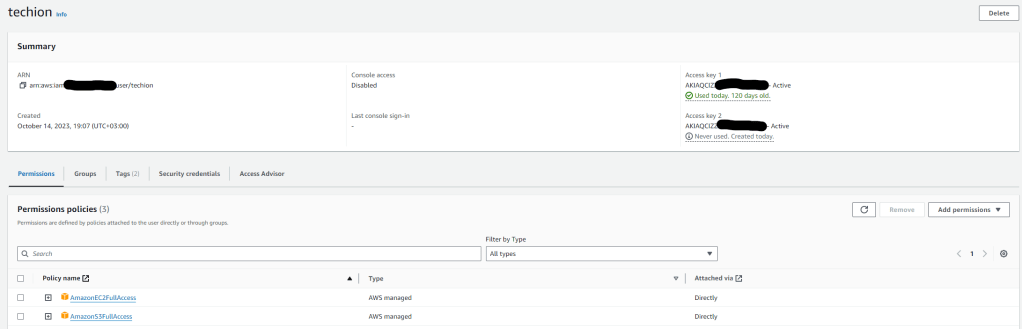
If you already possess an existing user, you can grant permissions to that user to carry out operations on EC2 and S3.
Click on “Add permissions” and search for AmazonEC2FullAccess and AmazonS3FullAccess. Refer to this guide for instructions on adding a new IAM user and assigning permissions.
AWS SDK properties definition and authentication
To authenticate to our AWS environment, we must incorporate the secret key and access key into the framework within a credential object. Then, we pass these credentials to our S3 and EC2 clients.
Define a configuration properties reader class
@Configuration
@ConfigurationProperties(prefix = "aws")
@Getter
@Setter
public class AWSConfigProperties {
    private String region;
    private String accessKey;
    private String secretKey;
}
We wil add the properties into a application-aws.properties file that will be used by spring from the environment.name gauge property.
aws.region=eu-central-1 (Add the region where you created the user and keys)
aws.accessKey=ADD_YOUR_ACCESS_KEY
aws.secretKey=ADD_YOUR_SECRET_KEY
Building a spring configuration class, define our credentials and pass them to the EC2 and S3 AWS clients
    @Bean
    public S3Client s3Client() {
        return S3Client.builder()
                .forcePathStyle(true)
                .credentialsProvider(credentials())
                .region(Region.of(awsConfigProperties().getRegion()))
                .httpClientBuilder(ApacheHttpClient.builder())
                .build();

    }

    @Bean
    public Ec2Client ec2Client(){
        return Ec2Client.builder()
                .credentialsProvider(credentials())
                .region(Region.of(awsConfigProperties().getRegion()))
                .httpClientBuilder(ApacheHttpClient.builder())
                .build();
    }

    public AwsCredentialsProvider credentials() {
        AwsBasicCredentials awsBasicCredentials = AwsBasicCredentials
                .create(awsConfigProperties().getAccessKey(),
                        awsConfigProperties().getSecretKey());
        AwsCredentialsProvider provider = () -> awsBasicCredentials;
        return provider;
    }
Creating the testing clients
An example of creating an EC2 instance involves injecting the Ec2Client into the testing client and utilizing it to create the instance using the RunInstanceRequest.

S3 test client

Defining the BDD step methods with the clients that we built

How is the spring profile selected?
The spring profile is selected by reading the environment.name propertie from the default.properties file and which is then passed to the RegisterIOC class to build the context

Context configuration based on the property
public class RegisterIOC {
    private ConfigurableApplicationContext context;

    @BeforeSuite
    public void registerIoc() {
        String environment = new StandardEnvironment().getProperty("environment.name", "");
        context = new SpringApplicationBuilder(BaseConfiguration.class)
                .web(WebApplicationType.NONE)
                .profiles(environment)
                .run();

        setClassInitializer(classToInitialize -> context.getBean(classToInitialize));
    }
}
The BaseConfiguration is an additional Spring configuration that imports the AWSConfiguration and incorporates all our defined beans with the EC2 and S3 clients.
This configuration also establishes a scenario context, which we will utilize to store various parameters such as instanceId or bucket name for later interaction with the objects.
@Configuration
@EnableAutoConfiguration
@EnableConfigurationProperties
@Import(AWSConfiguration.class)
public class BaseConfiguration {

    @Bean
    ScenarioContext scenarioContext(){
        return new ScenarioContext();
    }
}
Time for test execution
If you have the gauge plugin installed in Intelj then you can run the test directly from the feature file by clicking on the run icon
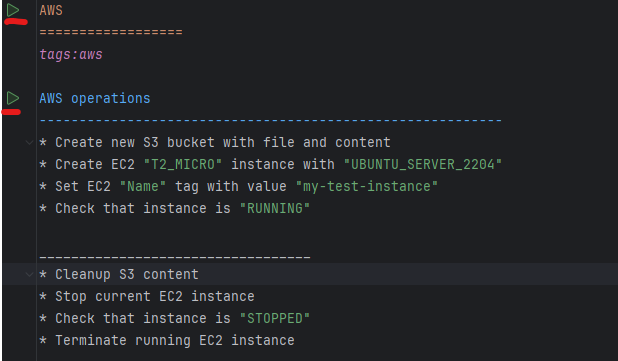
After executing the test, we can observe in AWS the objects that were created and subsequently removed at the conclusion of the test.
Amazon S3 Bucket

Amazon EC2 creation and termination


In the InteliJ console we can also see the created and deleted objects together with their name and id’s

The project can be found here https://github.com/diaconur/gauge_spring_boot/tree/gauge-aws and can be used just by adding your AWS keys into the application-aws.properties file.
All of the articles are free, so if you liked the content don’t forget to subscribe or give me a coffee 🙂
Resources and more data:
- https://docs.aws.amazon.com/sdk-for-java/latest/developer-guide/java_ec2_code_examples.html
- https://docs.aws.amazon.com/sdk-for-java/latest/developer-guide/java_s3_code_examples.html
- https://docs.aws.amazon.com/sdk-for-java/latest/developer-guide/setup-project-maven.html
- https://docs.aws.amazon.com/sdk-for-java/latest/developer-guide/credentials-temporary.html
Before leaving maybe you are interested also in:
- How to use Java streams in your automation framework
- Learn how to build a spring boot microservice
- Create a contract testing framework with Pact or with spring cloud contract testing
- Check how service discovery with Eureka works






 Development & Automation
Leave a comment