In the following article we will show how easy it is to add you microservice into a docker container and run it locally using docker and docker-compose.
A short intro about what is docker and why we use it can be found on the main docker page but shortly said is that a docker container is just a process which simulates a filesystem by using an image of an OS distribution of our choosing.
The difference between a docker container and a virtual machine is that the container is just a process that uses the OS kernel to consume resources and a virtual machine contains a full OS with all of it’s processes.
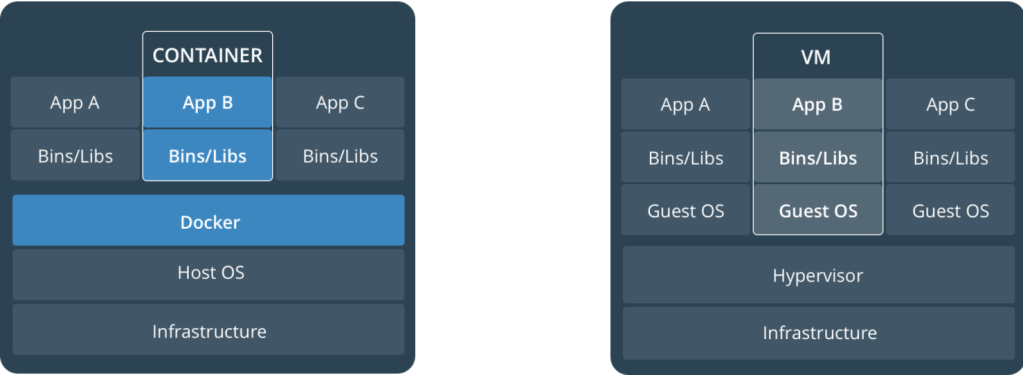
There are more differences about VM’s and docker but since this is not a docker tutorial let’s start by using docker and put our microservice into a container and run it.
In order to start using docker first you need to install it by following the instructions from the official site.
Let’s verify that docker is working and we can get an image and we can start a container.
Open a terminal and start typing

The docker command will download the latest ubuntu image if we don’t have it locally, it will run the container with an interactive terminal “-it” and it will remove the container once we exit.Notice the ubuntu version that comes with the image and the filesystem.
NOTE
One important note when running a java application inside a docker container is the CPU and memory allocation that needs to be limited to a certain amount according to the system resources.If you consider in seriously (prod,preprod etc) running java applications in docker containers, you will need to limit the CPU and memory to avoid running out of memory fast.
In our case, running a single container wont matter to much but more information about this you can find here.
- We will start by using the microservice that we build in the Spring Boot Microservice post and if you don’t want to follow the post and built it you can just checkout the code from the master branch.
Create another properties file called application-docker.properties and add the port that we will use to start the container with

This is everything that we need for the moment.
2. Create the Dockerfile
Inside the root location of the service create a file called Dockerfile and add the content

With the following commands docker will:
- FROM: Download the openjdk:8u242 image from dockerhub
- EXPOSE: Expose container port to 8080 when it will run
- ADD: Copy the service fat jar file inside the docker image
- ENTRYPOINT: execute the jar inside the container
Create the jar : mvn clean install
Create the docker image: docker build -t bonus-service .

If the image does not exist it will be downloaded from dockerhub locally and execute all the docker statements that we added inside the file.
Not we have a docker image with jdk8 and the service jar inside.
3. Start the docker container
Open the terminal and write:
docker run –rm -p8080:8080 -e “SPRING_PROFILES_ACTIVE=docker” bonus-service
The command will run the docker image the we built and execute the service with the docker spring profile.The container will be removed if we stop the service.

Verify that the service is running by accessing swagger
http://localhost:8080/swagger-ui.html
At this point the service is running inside the container and we can also see it in the terminal

You can also verify the container logs by using the docker logs command:
docker logs kind_chatelet -f
With the docker logs you need to specify the container name and in our case is kind_chatelet but you can also start the container with your own name by specifying the –name parameter into the docker run command.
docker run –rm -p8080:8080 -e “SPRING_PROFILES_ACTIVE=docker” –name bonuscontainer bonus-service.
Working with a single container is easy, the problem starts when you need to generate more then one container with the same service in order to balance the service load.
For the beginning this can be easily one with docker compose, which comes preinstalled with the docker application.But we will do this in another post.
Keep learning and have fun








 Development & Automation
Leave a comment